Technical note TN-05 Spec sheet
Computer Vision
Discovering and having fun with computer vision
- Issued
- Reading
- 6 min read
- Class
- Discover
- Keywords
- Format
- Raw Markdown
On this page
Introduction
What is computer vision?
This term refers to all the techniques and algorithms used to analyze visual content (photos, videos, GIFs, thermal sensor data, etc.).
To draw a parallel with human beings, computer vision is similar to our brain’s ability to name what our eyes see, classify it, record it, anticipate it or understand it.
The concept has existed since 1960, and many applications of mathematical models have made it possible to perform rudimentary detection and to extract some visual information from images, such as labeling.
In 1985, more advanced algorithms began to emerge, such as the Tesseract OCR (Optical Character Recognition) engine developed by Google and HP. For the first time, this program made it possible to turn an image into text that a computer could work with. (The project is still updated and maintained by Google.)
In the 1990s, the first human face detection systems appeared. This was made possible by techniques such as statistical learning.
Today, thanks to the rise of deep learning, computer vision has never been so accurate and fast.
Some classic algorithms
This field, in addition to being exciting, is increasingly accessible thanks to the many tools available today:
- Keras
- BoofCV
- OpenCV
- YOLO
- SimpleCV
- TensorFlow
- MATLAB
- CUDA (Nvidia)
I started by running a few experiments with different algorithms that do not rely on artificial intelligence.
Simple filter detection
The most basic way to detect an object or a shape in an image is to define a filter for our search. A filter can take several forms, but the easiest option is to use an image.
Once the filter has been defined, all you have to do is take an input, such as a photo, and pass the filter over every pixel of that image.
When the resemblance between the filter and a given area of the target photo reaches a certain level, we can report a detection.
This is what it looks like in practice!
I built this example with a Python script using OpenCV. Several times per second, I capture my computer screen and pass the filter over each capture to determine whether it is present.
If I find a match, I retrieve its coordinates and display a cross at its location, along with the name of what I am looking for.
This type of detection is very limited, because the element displayed on screen has to closely resemble the filter to produce a match.
Canny Edge Detection
This algorithm comes from John F. Canny, who developed it in 1986.
It builds on filter-based detection, but takes the concept further in order to increase the accuracy of the detection.
How does it work?
This method is based on simplifying the target image in order to keep only the important details: the Edges.
From a technical point of view, it consists of applying a Gaussian filter (to reduce the noise in the image) and using convolution masks to detect and bring out the contours of the image, thanks to the color changes between its different elements.
An image is made up of several thousand or even millions of pixels of different colors, with many possible variations.
John Canny’s algorithm removes the colors and keeps only the most rudimentary shapes of the processed images, to make detection easier and reduce the computational load.
Example of a Filter Edge
This demo is also based on a Python script using OpenCV. The goal is to detect the orange dots on the screen and click on them as fast as possible.
For this test, I implemented an algorithm that also aims to reduce the computational load on the computer and to make detection easier by modifying the image.
It is therefore not a Canny Edge, but a Filter Edge. By playing with the contrast and intensity of the image, I can remove the elements I am not interested in from the field of view.
As a result, I can make the algorithm much more lenient when computing the match between the filter and the target image.
Because of my computer’s performance and the way macOS handles screenshots, the results are not impressive, but it would work fine on another machine.
ORB (Oriented FAST and Rotated BRIEF)
Behind this intimidating name lies a relatively effective computer vision technique developed by OpenCV.
Once again, the goal of this algorithm is to define a filter. But instead of keeping the whole filter, we only keep a few anchor points.
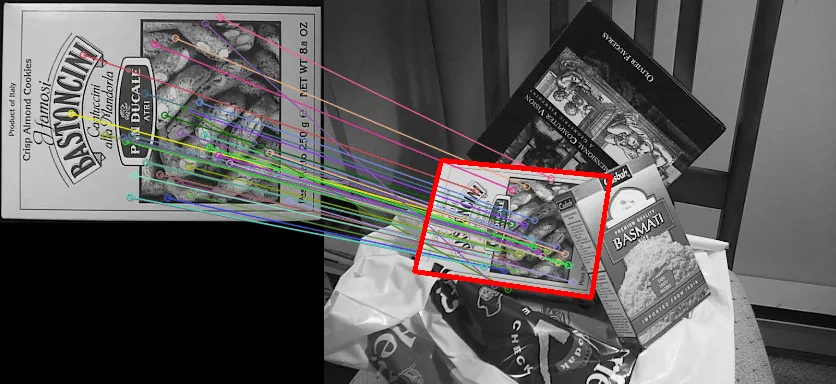
The next step is to look for a match between each point of our filter and our target image. If the algorithm finds more than X matching points in a given area of the image, it reports it and marks the detection.
This algorithm is particularly effective at detecting the presence of a filter in an image, but it is not precise when it comes to determining an exact position. The reason is that the filter is not applied in full: only some of its anchor points are.
ORB in action
For this example, I combined Canny Edge and ORB. This lets me keep as few elements as possible on screen, to limit false positives and reduce the computational load.
Despite the detections, we can see on the left-hand screen that the mouse does not move: my program cannot determine the position of the circles on screen because of the way the algorithm works, as it is a detection tool rather than a localization tool.
AI-boosted computer vision
Artificial intelligence has disrupted the world of computer vision. It offers unprecedented speed, efficiency and simplicity in image detection.
Many frameworks provide pre-trained AI models that offer a wide range of features.
With OpenCV and YOLO, for example, you can plug in your webcam and perform object recognition in a few minutes.
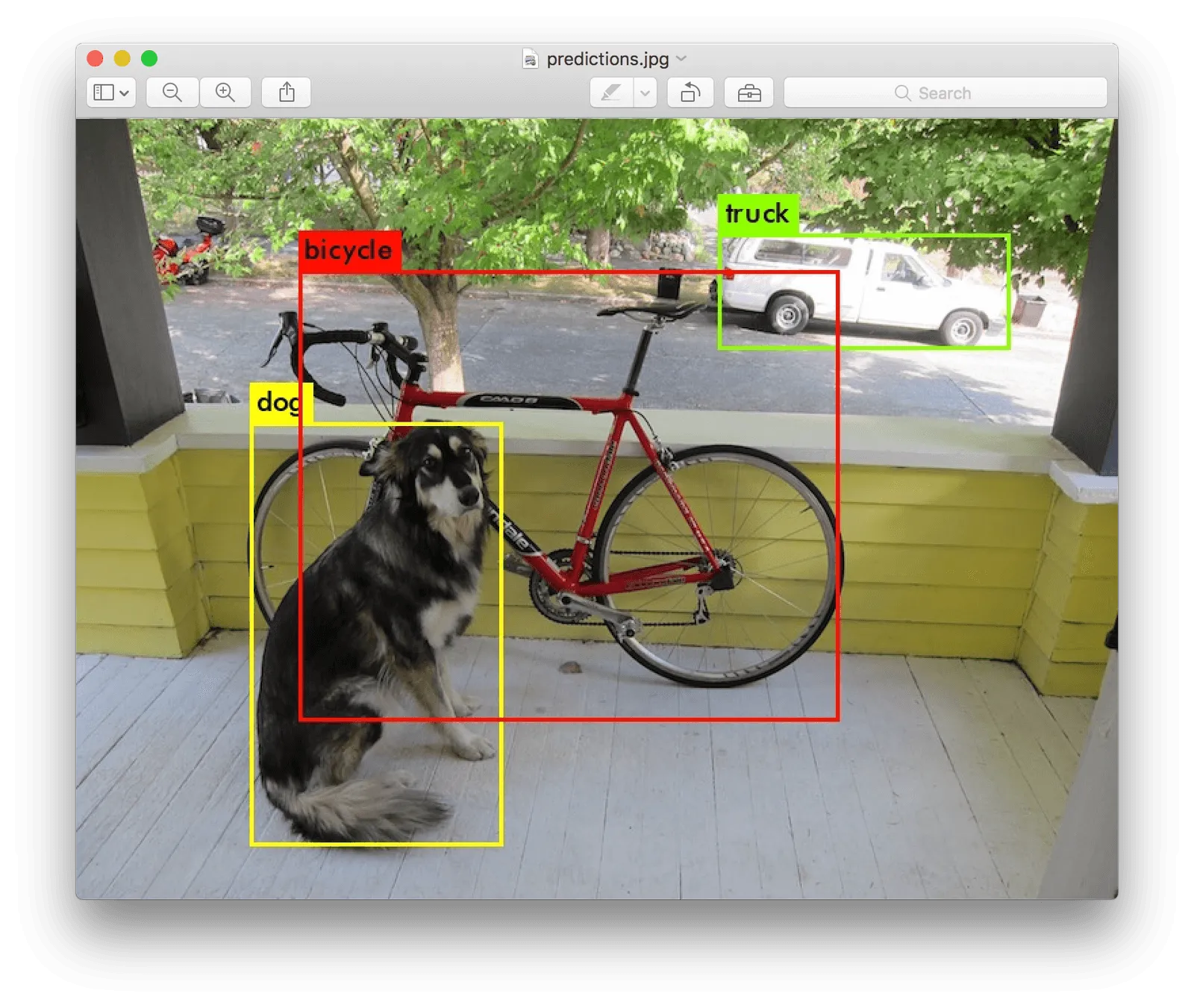
To explore what could be done with these tools, I built a “fitness assistant” based on Google’s MediaPipe framework.
The goal of this assistant is to check the range of motion when performing a weight training exercise: the curl.
Setup
The first step of the project was to set up a Python working environment with OpenCV and MediaPipe.
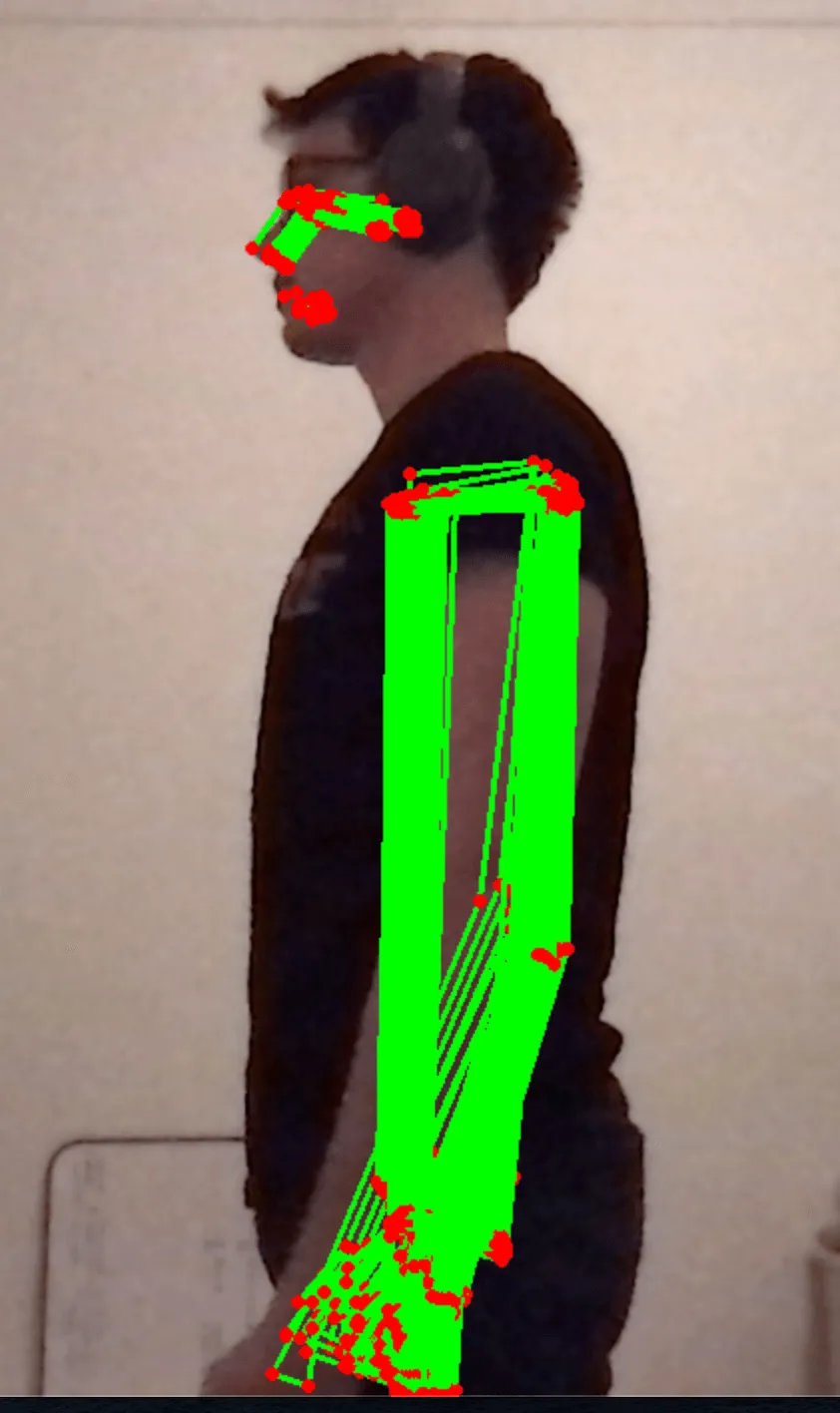
To make the setup easier, we will only work with a photo to begin with.
Here is the raw result returned by MediaPipe with its human body detection model.
We can see various anchor points on the head and the body.
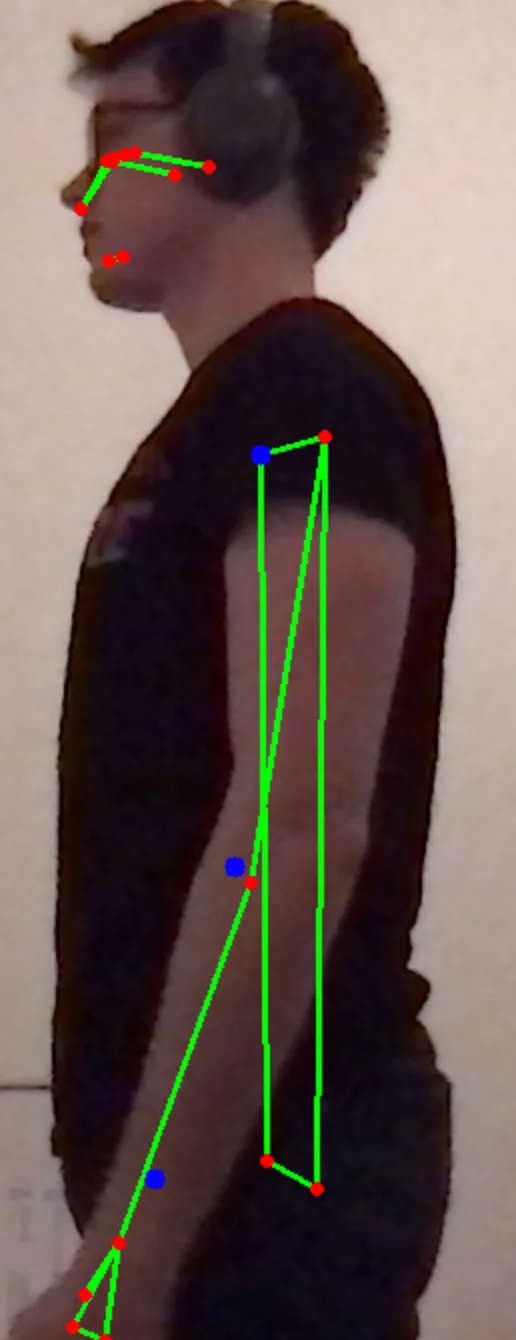
By following the framework’s documentation, we can isolate only the points of the body we are interested in.
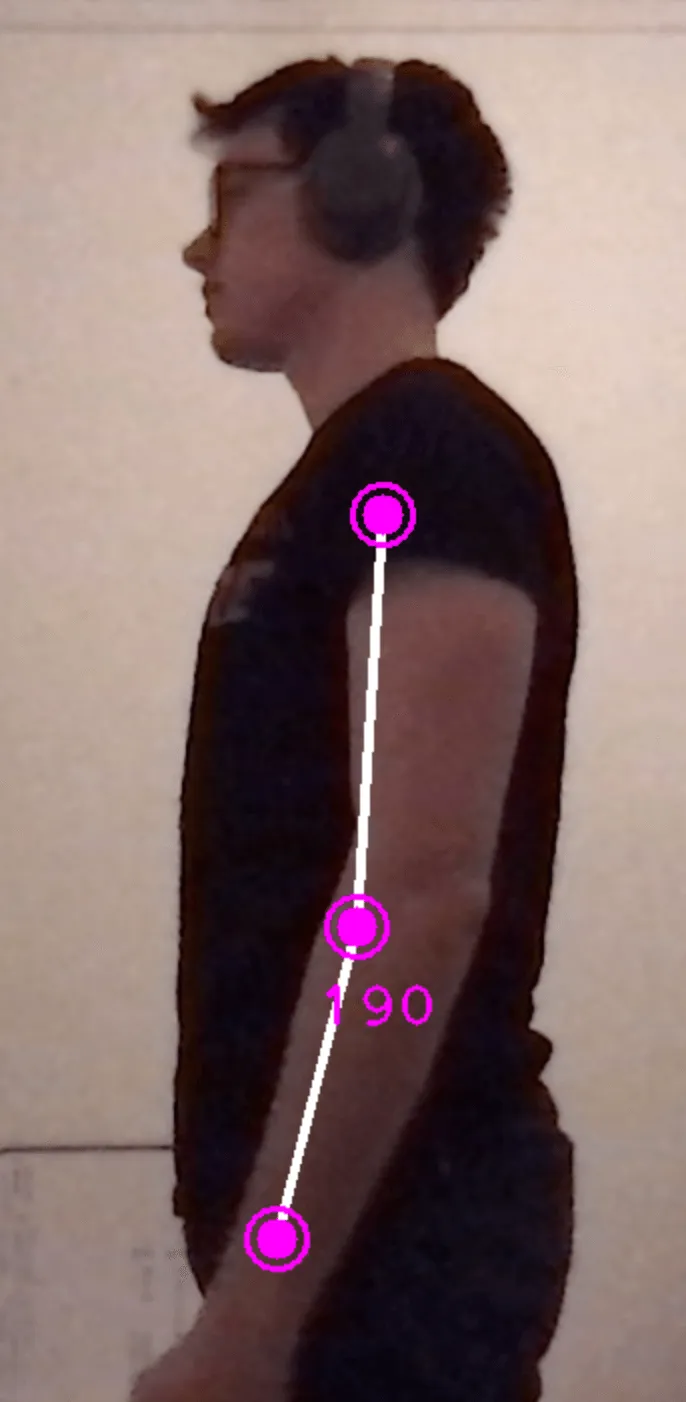
To simplify the visualization, we will only use OpenCV for the graphical rendering of the application.
By taking the coordinates of three consecutive joints, we can use a formula to compute the angle of the elbow and thus detect when our user bends their arm.
By adding some logic to our program, we can define a start angle and an end angle to guide users through their exercises.
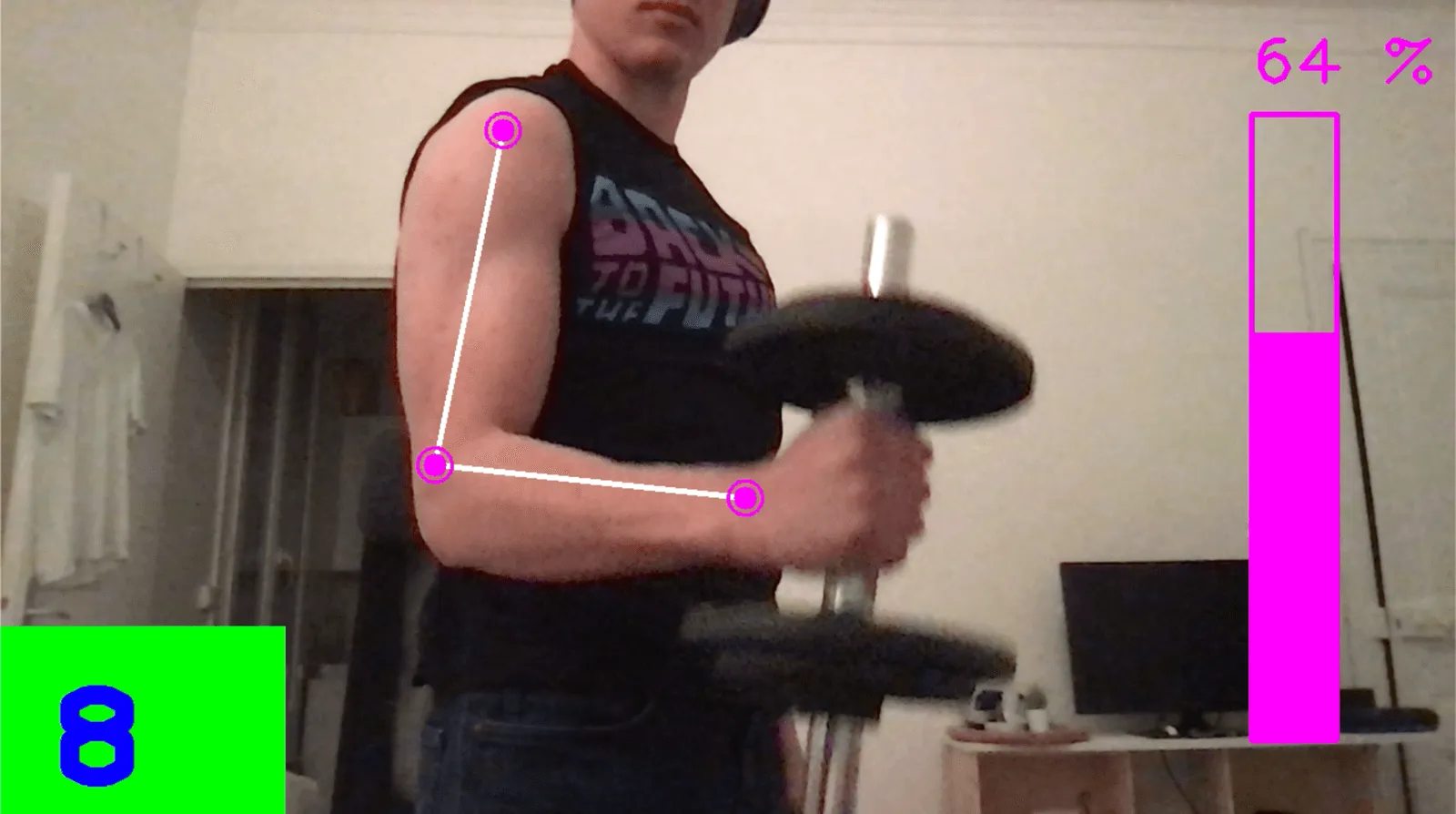
Final version of the app
Real-time feedback shows the number of repetitions as well as the progress of the current movement.
Conclusion
Computer vision is an exciting field that has evolved very quickly over the past 10 years and is increasingly in demand in our society.
More broadly, it addresses major needs in current challenges such as autonomous driving.
I strongly encourage you to give it a try, whether for fun or to build your skills in this area.